 Michael Wan Interactive Insights
 Introduction
The dominant mental model for using LLMs is conversational: you ask a question, you get an answer. But there is a second, arguably more powerful mode: using an LLM as a compiler that transforms a pile of raw documents into a structured, navigable, queryable knowledge base.
Think of it like this. A traditional compiler takes human-readable source code and produces machine-executable output. An LLM-compiled knowledge base takes a collection of raw source documents — papers, articles, repos, images — and produces a structured wiki: concept articles, cross-links, summaries, an index. Then, instead of querying a database with SQL, you query with natural language against the wiki you just compiled.
The pipeline is surprisingly simple, the tooling is already mature, and the results compound over time as you add more sources and file more query outputs back into the wiki. But keep the analogy honest: a compiler is only as good as its inputs and its rules. Feed it sloppy sources or vague instructions and it produces confident, well-formatted nonsense — at scale. The rest of this article is both the pipeline and the discipline that keeps it trustworthy.
The Full Pipeline
The system has five stages: raw data ingest, LLM compilation, the wiki itself, Q&A and linting, and output rendering. Each stage feeds the next, and outputs from the final stage feed back into the wiki.
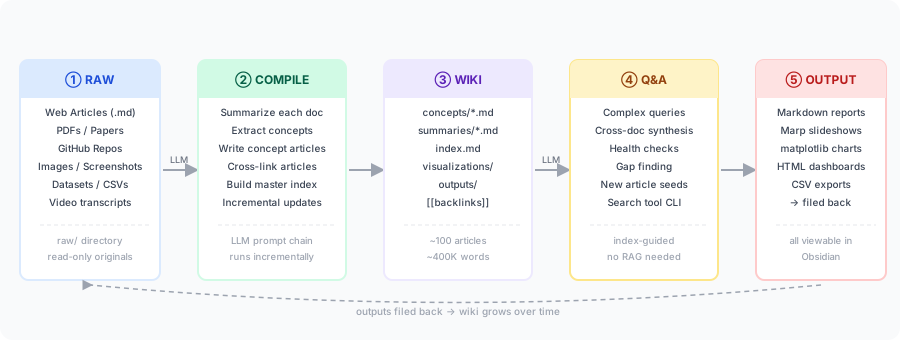
Stage 1: Data Ingest
The goal here is simple: collect raw source documents into an unmodified raw/ directory. The LLM never edits these files — they are the immutable source of truth.
Web Articles
For web content, the best tool is the Obsidian Web Clipper browser extension. It converts any web page to clean Markdown, strips boilerplate (nav, ads, footers), and saves directly to your vault. It has a separate hotkey to batch-download all images in the clipped article to local paths — this is critical, because LLMs cannot reliably fetch external image URLs mid-conversation.
An alternative for scripted ingestion is jina.ai Reader: prefix any URL with r.jina.ai/ to receive a clean Markdown version. This works well for building automated ingest pipelines.
# Example: ingest a URL via jina reader from CLI
curl -s "https://r.jina.ai/https://example.com/paper" > raw/articles/example-paper.md
PDFs and Papers
Microsoft’s markitdown CLI converts PDFs, Word documents, Excel sheets, PowerPoint, HTML, images, audio, and more into Markdown. It runs locally with no API key required:
pip install markitdown
markitdown raw/papers/paper.pdf > raw/papers/paper.md
For academic papers, ar5iv provides clean HTML versions of arXiv papers that clip much better than the PDF version. The Semantic Scholar API can also pull structured metadata (title, abstract, references) in JSON for any paper.
Videos and Audio
yt-dlp downloads audio from YouTube or any video site, and OpenAI Whisper (running locally) transcribes it to text. This extends the knowledge base to conference talks, podcasts, and recorded lectures — content types that would otherwise be inaccessible.
yt-dlp -x --audio-format mp3 -o "raw/audio/%(title)s.mp3" <URL>
whisper raw/audio/talk.mp3 --output_format txt --output_dir raw/transcripts/
Repos and Codebases
For code repositories, the goal is not to give the LLM every source file, but to give it a navigable summary. A useful pattern:
# Generate a repo map for LLM consumption
git -C repo/ log --oneline -50 > raw/repos/repo-git-log.txt
find repo/ -name "*.md" -exec cat {} + > raw/repos/repo-docs.md
cat repo/README.md repo/ARCHITECTURE.md >> raw/repos/repo-overview.mdraw/ and wiki/summaries/. When the LLM compiles raw/articles/paper-a.md, it writes wiki/summaries/paper-a.md. This makes incremental compilation logic trivial.
Stage 2: Wiki Compilation
Raw files are inert. A folder of clipped articles is a pile, not a knowledge base — so how does the pile become a wiki? This is the compile step, and it is the core of the system. An LLM reads raw documents and writes a structured wiki. The key insight is to do this incrementally: maintain a log of compiled files and only process new or updated sources, so cost scales with what changed, not with the whole corpus.
The Two-Pass Approach
A reliable pattern is to split compilation into two passes:
Pass 1 — Per-document summaries. For each new raw document, ask the LLM to write a structured summary to wiki/summaries/<slug>.md. The summary should capture: a 3-5 sentence overview, the key concepts mentioned, claims made, methods used, and links back to the raw source. This pass is parallelizable — each document is summarized independently.
# Compilation prompt — Pass 1
Read: raw/articles/new-paper.md
Write: wiki/summaries/new-paper.md

Format:
---
source: raw/articles/new-paper.md
date: 2024-03-15
---
## Summary
<3-5 sentences>

## Key Concepts
- [[concept-a]], [[concept-b]]

## Claims
- ...

## Methods
- ...
Pass 2 — Concept synthesis. The LLM reads all new summaries and updates (or creates) concept articles. It reads wiki/index.md first to understand existing concepts, then decides where new information belongs. Entirely new concepts get new files; existing concepts get updated sections.
This two-pass structure keeps each LLM call focused and context-efficient. Pass 1 contexts contain one raw document at a time. Pass 2 contexts contain several summaries and the index — much smaller than raw sources.
The trade-off is where errors hide. Pass 2 is synthesis, and synthesis is where an LLM can quietly invent — merging a claim from paper A with a caveat from paper B into a sentence neither source actually supports. Guard against it with the rule below.
(source: [[summaries/paper-a]]). This turns silent synthesis errors into checkable ones: if a claim has no source, it is a hallucination candidate, and a linting pass (Stage 4) can flag it automatically.
The Master Index
wiki/index.md is the most important file in the system. It is the LLM’s routing map for any Q&A task. It should list every concept article (with a one-line description) and every source summary (with a one-liner). The LLM reads this first on every query, then selects which full articles to read.
# Knowledge Base Index

## Concept Articles
- [[concepts/transformer-attention]] — Self-attention mechanism; Q/K/V projections, scaled dot-product
- [[concepts/mixture-of-experts]] — Sparse MoE routing; token dispatch; load balancing
- [[concepts/rlhf]] — Reinforcement learning from human feedback; reward model training

## Summaries
- [[summaries/attention-is-all-you-need]] — Vaswani et al. 2017; original Transformer paper
- [[summaries/gpt4-technical-report]] — OpenAI 2023; GPT-4 capabilities and limitations
Keep descriptions short and precise. Vague index entries degrade routing accuracy — the LLM needs enough signal to know whether an article is relevant to a query.
Backlinks and Cross-References
At the end of each concept article, the LLM maintains a ## Backlinks section listing all other articles that reference this one. This is updated on each compilation pass. In Obsidian, [[wikilinks]] are rendered as clickable links and also appear in the graph view — giving you a visual map of how concepts connect.
Stage 3: The Wiki Structure
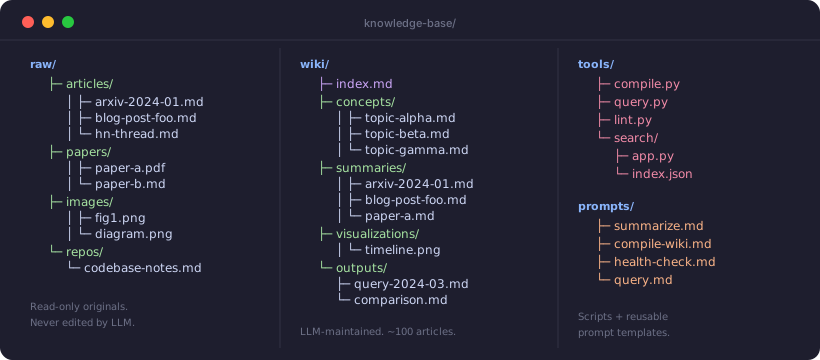
After several compilation passes, the wiki directory settles into a predictable structure:
wiki/
├── index.md                    # Master routing map — updated each pass
├── concepts/
│   ├── transformer-attention.md
│   ├── mixture-of-experts.md
│   └── rlhf.md
├── summaries/
│   ├── attention-is-all-you-need.md
│   └── gpt4-technical-report.md
├── visualizations/
│   └── concept-timeline.png    # LLM-generated matplotlib output
└── outputs/
    ├── compare-gpt4-claude.md  # Filed query answer
    └── gap-analysis-2024-03.md
The LLM writes and maintains all files in wiki/. You rarely touch them directly. This is a meaningful shift: the LLM is not an assistant helping you write documents — it is a system process running over your data corpus.
At What Scale Does This Work Without RAG?
At ~100 concept articles and ~400K total words, the index-routing approach works well without any vector database or retrieval system. The LLM reads index.md (a few KB), selects 3-8 relevant articles, and reads those in full. A modern LLM’s 200K context window comfortably fits this.
| Scale | Approach | Index Strategy |
|---|---|---|
| Small <30 articles |
Full context | Feed the entire wiki in one context window. No routing needed. |
| Medium 30–200 articles |
Index routing | LLM reads index.md first, then selects and reads relevant articles. Works without RAG. |
| Large 200–1000 articles |
Index + search tool | Add a BM25 or TF-IDF search CLI as a tool call. LLM uses it to narrow candidates before reading. |
| Very large >1000 articles |
RAG required | Vector embeddings + semantic retrieval. But at this scale, consider whether synthesis is still tractable. |
Stage 4: Q&A and Linting
With the wiki compiled, you can ask complex multi-document questions that would be impractical against the raw corpus.
Q&A Query Pattern
The routing pattern for Q&A is always the same: read the index, select articles, read them, synthesize.
# Query prompt template

You are an expert research assistant with access to a
knowledge base at wiki/.

Question: [complex multi-part question]

Procedure:
1. Read wiki/index.md
2. List the concept articles and summaries most relevant
   to this question
3. Read those files in full
4. If a cited claim needs verification, read the
   relevant source summary
5. Synthesize a detailed answer
6. Save output to wiki/outputs/<slug>.md
Health Checks and Linting
One of the most valuable applications is automated wiki linting — asking the LLM to scan the wiki for quality issues:
Inconsistency detection: “Read all concept articles. Identify any claims that contradict each other across articles. Output a table: {article_1, claim_1, article_2, claim_2, severity}.”
Gap imputation: “Given the concepts in index.md, what important related topics appear to be missing? For each gap, suggest: the missing concept, what it should cover, and which raw sources might already contain relevant data.”
Web augmentation: The LLM can be given a web search tool. When it identifies a gap with no relevant raw source, it searches the web, retrieves the content via r.jina.ai, and proposes adding it to raw/ for the next compilation pass.
Connection mining: “What non-obvious connections exist between concepts in the wiki? Identify pairs of concept articles that don’t link to each other but probably should, and explain why.”
Building a Search CLI
At medium scale, it becomes useful to build a small search engine over the wiki. A minimal inverted index implementation takes ~100 lines of Python:
# tools/search/build_index.py
import os, json, re
from collections import defaultdict

def build(wiki_dir):
    index = defaultdict(list)
    for root, _, files in os.walk(wiki_dir):
        for f in files:
            if not f.endswith('.md'):
                continue
            path = os.path.join(root, f)
            text = open(path).read().lower()
            for word in re.findall(r'\b\w{4,}\b', text):
                if path not in index[word]:
                    index[word].append(path)
    return dict(index)

if __name__ == '__main__':
    idx = build('wiki/')
    json.dump(idx, open('tools/search/index.json', 'w'))

# tools/search/query.py
import json, sys
idx = json.load(open('tools/search/index.json'))
terms = sys.argv[1:]
results = set.intersection(*[set(idx.get(t.lower(), [])) for t in terms])
for r in sorted(results):
    print(r)
The LLM calls this as a tool via CLI: python tools/search/query.py mixture experts routing returns the list of matching files, which it then reads in full.
Interactive: Pipeline Stage Explorer
Click each stage to explore the tools, example prompts, and common pitfalls in detail.
Stage 5: Outputs and Rendering
All query answers are rendered as files and viewed in Obsidian. The key discipline: every output is filed back into the wiki. This is what makes the system compound — past query results become part of the knowledge base and can themselves be referenced by future queries.
Marp Slideshows
Marp converts Markdown to presentation slides using a YAML frontmatter flag. The Obsidian Marp plugin renders slides in-editor. The LLM writes slide decks as part of summarizing a research area:
---
marp: true
theme: default
paginate: true
---

# Mixture of Experts: Research Summary
## Knowledge Base — March 2024

---

## Core Idea
...content from wiki/concepts/mixture-of-experts.md...

---

## Timeline of Key Papers
| Year | Paper | Contribution |
|------|-------|-------------|
| 2017 | Shazeer et al. | Sparsely-gated MoE |
| 2022 | Switch Transformer | Simplified routing |
| 2024 | DeepSeek-V2 | MLA + MoE combined |
matplotlib Charts
For timeline charts, comparison plots, or distribution visualizations, the LLM writes a Python script that reads data from the wiki and saves a .png to wiki/visualizations/. The script is deterministic — same inputs, same output path — so Obsidian always finds the latest version.
# Generated by LLM: wiki/tools/timeline.py
import matplotlib.pyplot as plt
import matplotlib.patches as mpatches

papers = [
    ('GPT-2', 2019, 'language'), ('BERT', 2018, 'language'),
    ('AlphaFold2', 2020, 'science'), ('Whisper', 2022, 'audio'),
    # ... parsed from wiki/summaries/*.md
]
# ... chart generation code
plt.savefig('wiki/visualizations/paper-timeline.png', dpi=150, bbox_inches='tight')
Obsidian as the Frontend
Obsidian serves several roles beyond a Markdown viewer:
- Graph view shows the wiki as a network of concept nodes connected by
[[wikilinks]]. This gives an immediate visual sense of the knowledge structure and reveals isolated nodes that need better integration. - Canvas (built-in Obsidian plugin) lets you drag concept cards onto a 2D canvas and arrange them spatially — useful for thinking through relationships the LLM hasn’t formalized yet.
- Dataview (community plugin) lets you query frontmatter fields across all wiki files with a SQL-like syntax, e.g., list all concept articles updated in the last 30 days.
- Excalidraw (community plugin) renders embedded Excalidraw diagrams that the LLM can also generate programmatically.
The Compounding Effect
The most important property of this system is that it compounds. Each query result filed back into the wiki becomes a source for future queries. Each linting pass improves the accuracy of future responses. Each new batch of raw sources is summarized and integrated into existing concept articles — the articles don’t start over, they accumulate.
After a few weeks of active use on a research area, the wiki develops a quality that would be impossible to achieve by writing it manually: it synthesizes dozens of sources, tracks inconsistencies, and reflects your specific research questions through the filed query outputs.
wiki/outputs/ is what separates a wiki that grows in value from one that stays flat.
When this is the wrong tool
The compounding effect is real, but so is the setup cost, and this approach is not always worth it. Compilation spends LLM calls on every source and every pass, which is money and time before you ask a single question. It pays off when the corpus is large, stable, and revisited often — a research area you will work in for months. It is the wrong tool in three cases.
raw/, because the compile step can paraphrase away the exact wording). Match the machinery to the corpus, not the other way around.
Future Direction: Synthetic Data and Fine-tuning
At a large enough wiki scale, the natural next step is to convert the wiki itself into training data. The wiki already contains:
- Structured concept articles (good for instruction fine-tuning on domain Q&A)
- Pairs of raw documents + summaries (good for summarization fine-tuning)
- Backlinks and cross-references (good for retrieval and classification tasks)
A synthetic data generation pass asks the LLM to generate question-answer pairs from concept articles. The resulting dataset can fine-tune a smaller model (e.g., a 7B parameter model via LoRA) to “know” the domain in its weights rather than requiring it in the context window.
This is not yet a standard workflow — the tooling (synthetic data pipelines, LoRA fine-tuning infrastructure) adds significant complexity. But the trajectory is clear: the compiled wiki becomes a training corpus, and the fine-tuned model becomes a faster, cheaper query engine for the domain.
Key Takeaways
- Treat the LLM as a compiler, not an assistant. It processes a corpus and produces structured output — you don’t write the wiki, it does.
- Keep raw/ immutable. All LLM writes go to wiki/. This gives you a clean audit trail and makes re-compilation possible.
- The index.md is the system’s backbone. Degrade the index and Q&A degrades. Maintain it on every compilation pass.
- No RAG required at moderate scale. Index routing + large context windows handle ~100-200 articles comfortably.
- File everything back. Every output, every query answer, every linting result — filed to wiki/outputs/. The compounding effect is the whole point.
- Obsidian is just the viewer. The LLM does all writes. Use Obsidian’s graph view and Canvas to develop spatial intuition about the knowledge structure, not as a writing environment.